




스탠다드차타드은행BI컬러 바

Standard Chartered BankStandard Chartered Bank U-Bank
  • About Us
  • Help
  • Branch
  • SiteMap
  • Korean


Welcome to Standard Chartered Bank
Loginjoin


Issuance of certificate on Breeze

  • Fontsizezoominzoomout

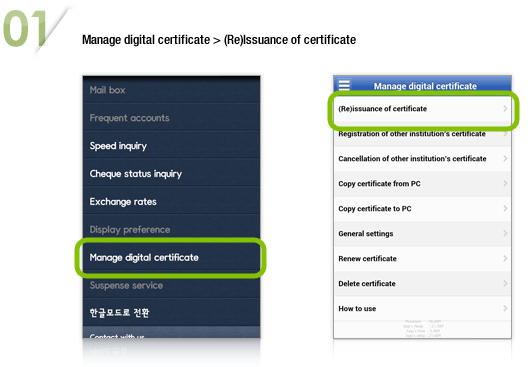
01. Open Breeze on mobile -> 02. Click ‘Manage Digital Certificate’  -> 03. Click ‘(Re)issuance of certificate’
  • If you have already issued digital certificate from other institution, (Re)issuance on Breeze is not available.
  • If you have a digital certificate stored on your PC, reissuance via mobile devices automatically deletes your certificate in the PC.
  • Issuance of digital certificate for business customers are not available here.

Process of Issuance

  1. 01. Manage digital certificate > (Re)Issuance of certificate
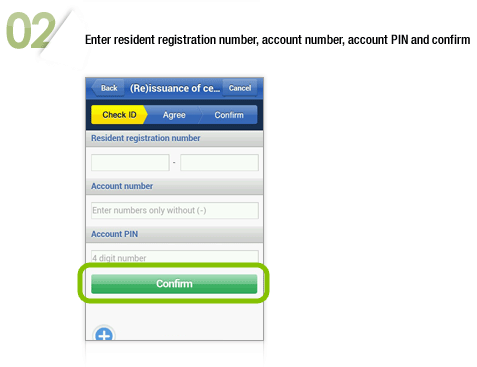
  2. 02. Enter resident registration number, account number, account PIN and confirm
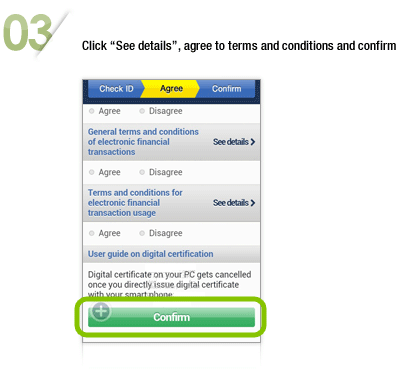
  3. 03. Click “See details”, agree to terms and conditions and confirm
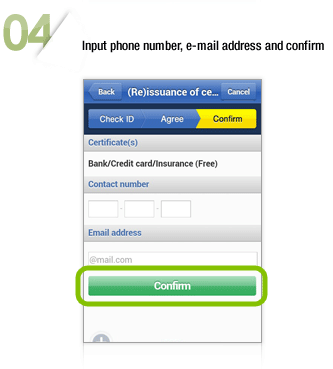
  4. 04. Input phone number, e-mail address and confirm
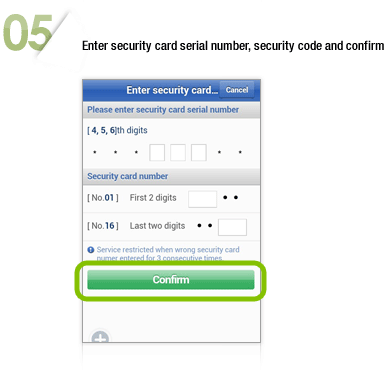
  5. 05. Enter security card serial number, security code and confirm
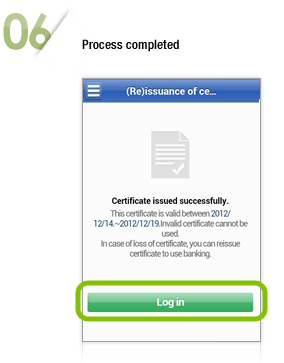
  6. 06. Process completed